About five years ago I did something that felt slightly reckless at the time. I turned off work email notifications on my phone. No banners, no badges, no little buzz in my pocket at the dinner table telling me someone, somewhere, wanted something.
It was one of the best decisions I’ve ever made. Running two businesses, CCTV Aware and Metserve Media, there is always another email. There is always a customer with a question, a supplier with an update, an invoice to chase. None of that stops at 5pm just because I’d like it to. Switching the notifications off didn’t make the work go away, it just meant I chose when to look at it, rather than it choosing for me.
But it was a blunt tool. Email was only one app. The CCTV and alarm apps, the customer messages, the calendar reminders for tomorrow’s site survey, they all still found their way through. And if I’m honest, every one of those was a small invitation to “just quickly deal with it” when I should have been somewhere else entirely.
The revelation: Focus modes, on a schedule
Apple’s Focus modes have been on the iPhone for a few years now, and I’d always filed them under “Do Not Disturb with extra steps”. I was wrong. What I’ve only recently properly clocked is two things.
First, a Focus can switch itself on and off on a schedule. You don’t have to remember to tap anything.
Second, it syncs. Turn on the option to share Focus across your devices and whatever mode your iPhone is in, your iPad and Mac follow. Same Apple account, same rules, everywhere.
Put those two together and you’ve got something I’ve been trying to build with willpower for years, except now it runs on its own.
How I’ve set it up
I’ve got two modes: Work and Personal.
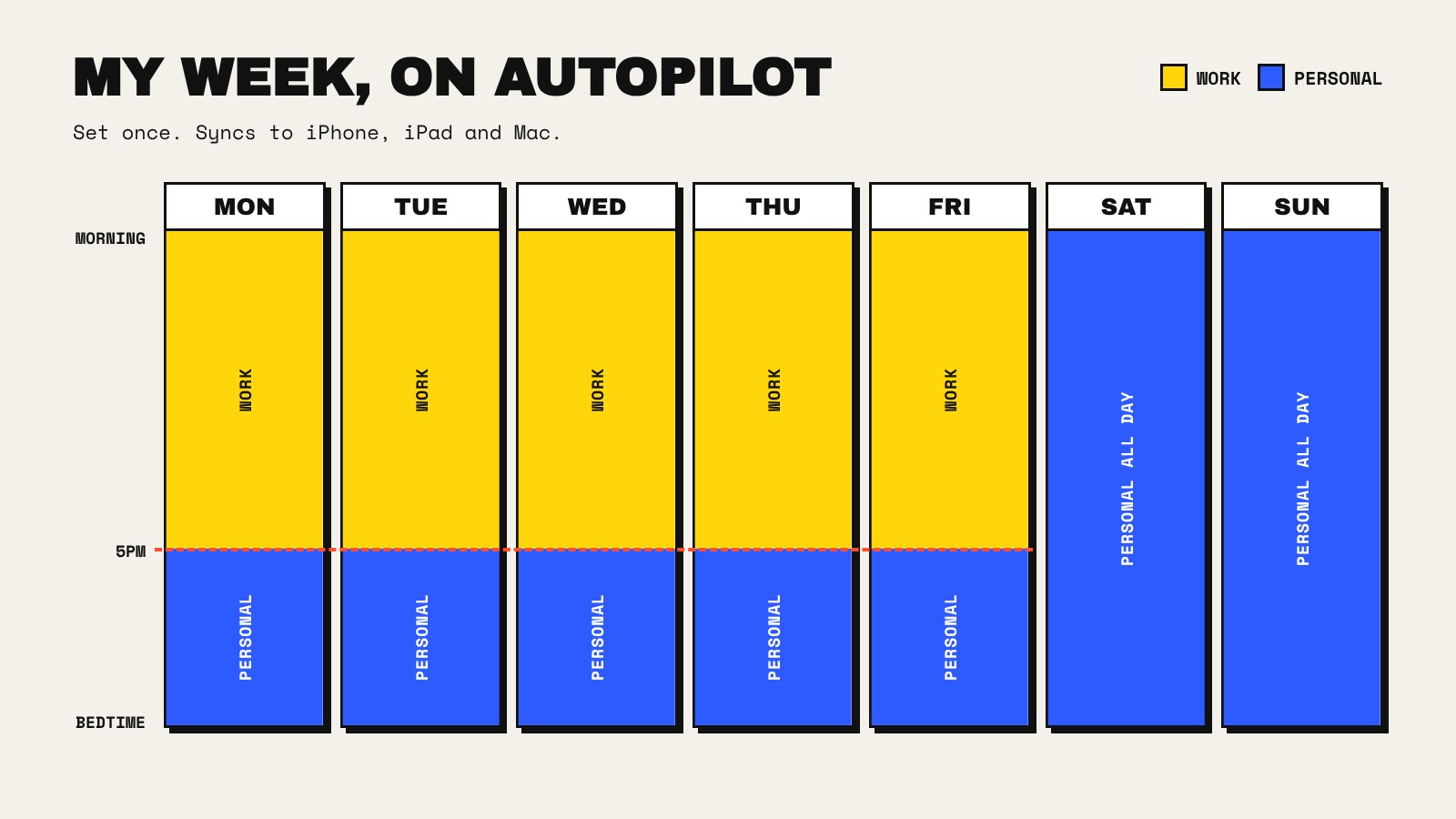
During the week, in working hours, Work is on. Everything comes through. Customer enquiries, alarm and CCTV app alerts, work email, calendar reminders. That’s exactly what I want, because those are the hours I’m there to run the business and look after our customers properly, and I’d rather be quick and responsive when it counts.
Then at 5pm on a weekday, and all day Saturday and Sunday, Personal takes over automatically. Every business related app is silenced. Not hidden in a folder, not “I’ll try not to look”. Silenced. The notifications simply don’t arrive until Work mode comes back on.
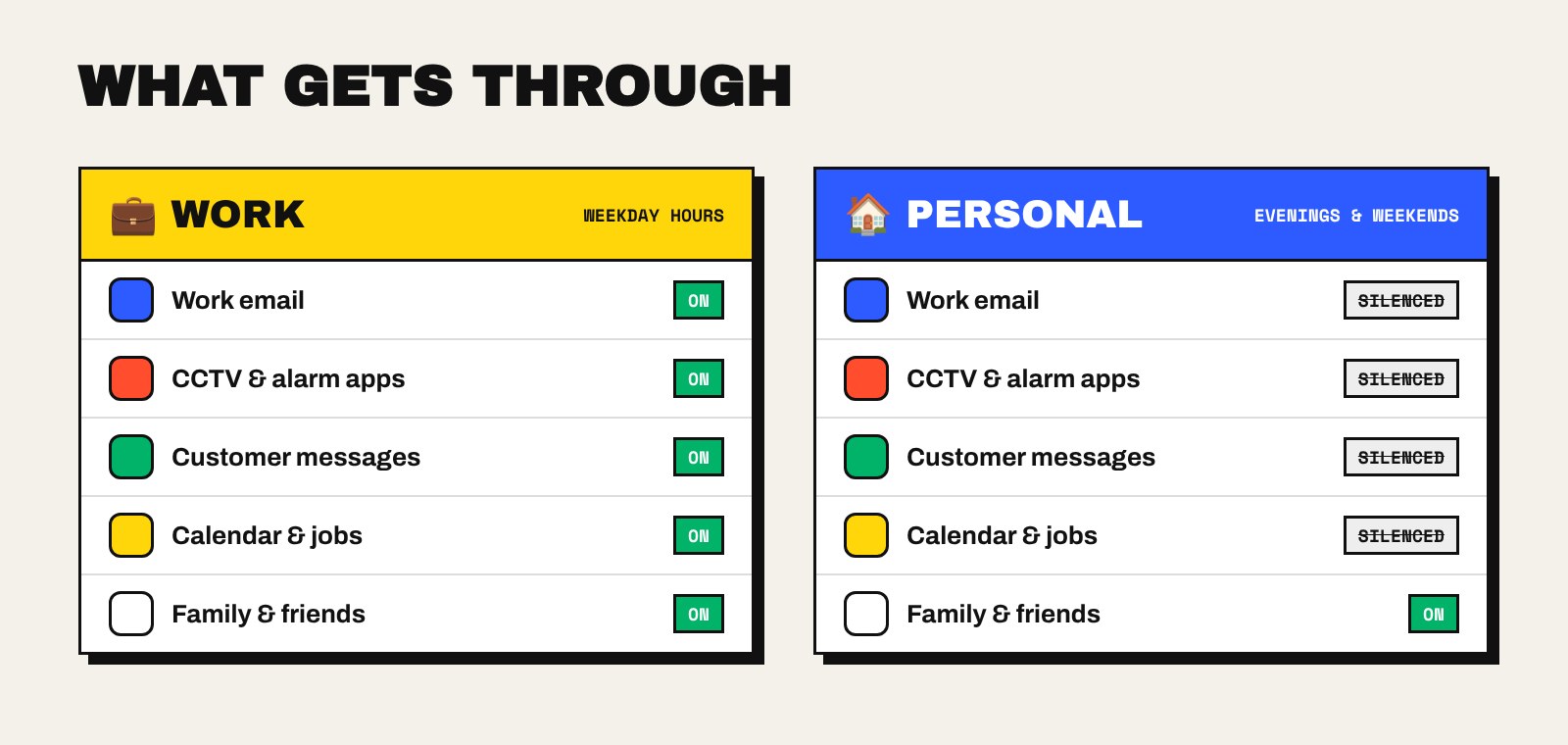
Family and friends still get through in both modes, obviously. If my wife or the kids need me, they reach me. It’s the business that has to wait.
Why this matters more than it sounds
I’ve written before about why I switch off every summer: the idea that you only get around eighteen summers with your children before they’re grown. Six weeks off once a year is the big gesture. But the rest of the year is made up of hundreds of ordinary evenings and weekends, and those are just as easy to lose, one “quick reply” at a time.
The thing I’ve learned is that willpower is a poor system. If the notification arrives, I’ll read it. If I read it, I’ll start thinking about it. And once I’m thinking about it, I’m not really at the dinner table any more, even if I’m sitting at it.
Taking the decision away from myself is the whole point. At 5pm the phone makes the call for me, and the Mac on my desk does the same, so there’s no sneaking back to the laptop “just to check”.
Does the business suffer?
Honestly, no. Customers get my full attention during working hours, which is when they’d reasonably expect it. Very little that arrives at 8pm on a Friday is actually urgent. It just feels that way when it’s lighting up your screen.
If anything, I’m sharper on Monday morning because I’ve actually had a weekend.
If you want to try it
You’ll find it under Focus in your iPhone’s Settings. Create a Work mode and a Personal mode, choose which people and apps are allowed to notify you in each, then add a time schedule to each one. Make sure sharing across devices is switched on so your iPad and Mac follow along. Apple’s own guide to setting up a Focus walks through it step by step.
It doesn’t take long. I just wish I’d done it five years ago, at the same time I switched off that email.
If you’ve found other ways to keep work in its box, I’d genuinely like to hear them. Drop me a message.